





 +91 88949 00142
 +1 (307) 435-9605
Suave Creators makes two of the options in this list: Suave CRM (free) and custom CRMs we build for clients. We've listed every other CRM's prices from public sources, linked at the end, and we say plainly where our own options are not the best fit.
Most CRM comparisons rank tools on features you'll never use. For a 5 to 100 person business, three questions matter more: what will it cost for the whole team, does it cover the work you do after a deal is won, and will it still fit in three years? This guide compares 10 options on exactly that, including the option most lists ignore: building your own.
10
CRMs compared, including a custom build
5–100
Person teams this guide is written for
3
Questions: team cost, work after the sale, and fit in three years
Quick answer
The best CRM depends on what you need beyond sales
- HubSpot suits teams that want marketing tools in the same place.
- Pipedrive suits simple sales pipelines.
- Zoho CRM and Freshsales cost the least per user.
- Suave CRM is free and adds projects, timesheets, HR and invoicing.
- Companies with unusual processes or 50+ users often get better value from a custom CRM.
The 10 best CRMs compared
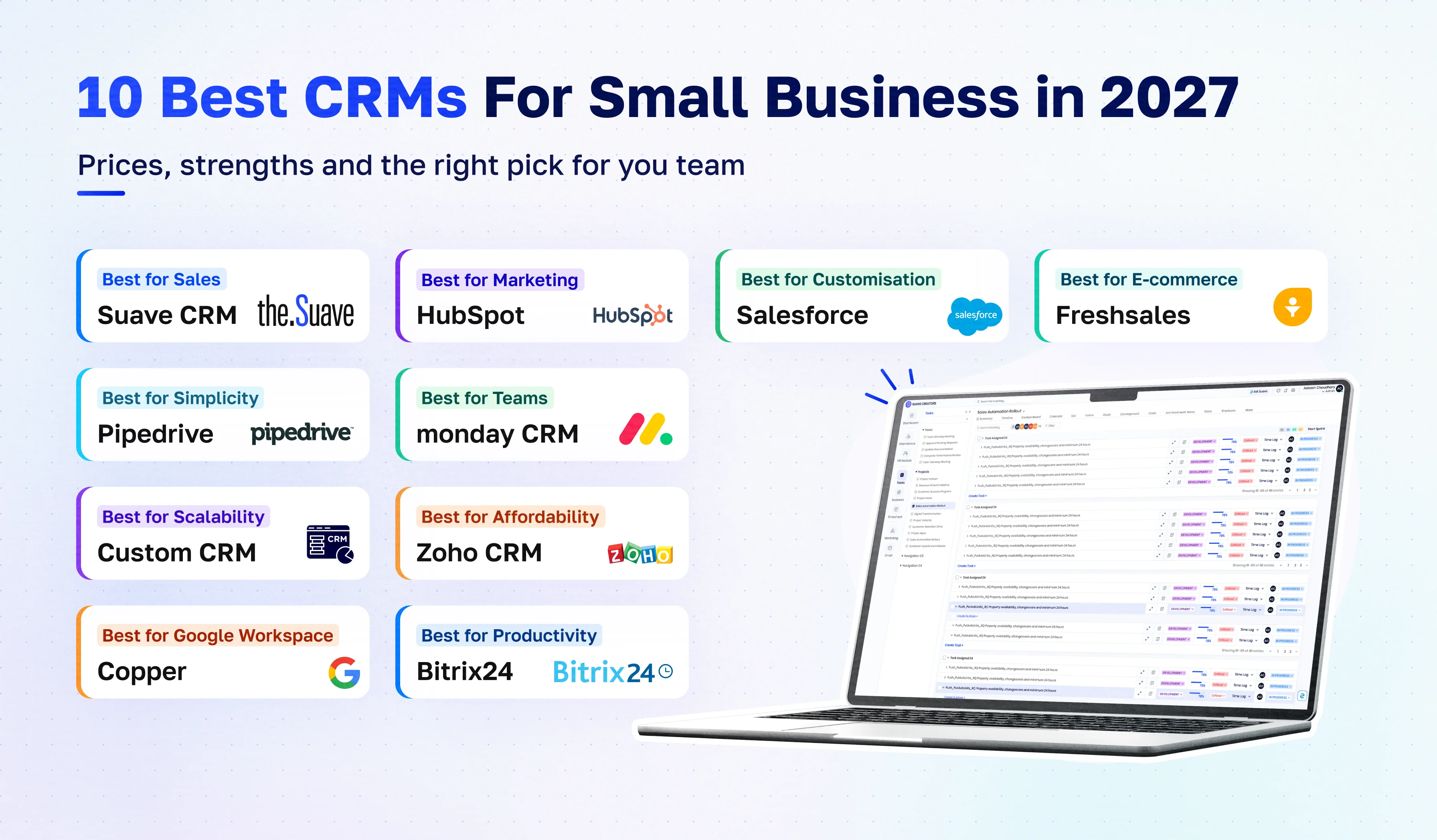
| CRM | Best for | Starting price (USD) | Free plan | Projects, timesheets, invoicing | Watch out for |
|---|---|---|---|---|---|
| Suave CRM | Agencies, IT and service teams that sell and deliver | Free for small and mid-size companies | Yes | Yes, all built in | Web app only; Gmail only for email; fewer integrations than the big names |
| HubSpot | Sales and marketing in one place | Starter about 20/seat/month; Professional 90/seat/month (annual) | Yes, up to 2 users | No | Costs rise fast at Professional |
| Salesforce | Growing teams that need deep customisation | Starter Suite 25/user/month; Pro Suite 100/user/month | No (trial) | No | Complex to set up and run |
| Zoho CRM | Low cost per user with many add-on apps | Standard 14/user/month (annual) | Yes, up to 3 users | Via separate Zoho apps | Many apps to manage |
| Pipedrive | Simple, visual sales pipelines | From about 14/seat/month (annual) | No (14-day trial) | No | Light on marketing and service |
| Monday CRM | Teams already using monday.com | Basic 18/seat/month, minimum 3 seats | No | Via monday work management | Seat minimums |
| Freshsales | Budget sales CRM with built-in phone and email | Growth from about 9–11/user/month | No | No | Sources quote different prices; check before buying |
| Bitrix24 | CRM plus tasks, chat and intranet | Free plan; Basic 49/month for 5 users (annual) | Yes | Tasks free; time tracking and invoices paid | Busy interface |
| Copper | Teams that live in Google Workspace | Basic 23/user/month (annual) | No | No | Best only inside Google Workspace |
| Custom CRM by Suave Creators | Unusual processes, strict data rules, 50+ users | One-off build, [USD range from your quotes] | N/A | Built to your workflow | Higher upfront cost and build time |
How we chose and compared these CRMs
We looked at each CRM the way a small or mid-size business buys one:
| What we compared | What it means |
|---|---|
| Total cost for the team | Price per user multiplied by the people who need a login, not just the sales team. |
| Coverage after the sale | Projects, time tracking, invoicing and HR, or the extra tools you'd need for them. |
| Ease of setup | How quickly a team without an admin can start. |
| Room to grow | Automation, reporting and integrations at the next tier. |
| Ownership and lock-in | Who owns the data and how hard it is to leave. |
10 Best CRMs for Small Business, Reviewed
1. Suave CRM — best free all-in-one CRM for agencies and service teams
Best for: IT agencies, software companies, digital agencies and startups that sell and deliver client work.
Suave CRM puts a sales pipeline with AI lead scoring, projects and tasks, timesheets, invoicing, attendance and HR, team chat and an AI assistant in one web app. A won deal becomes a project, hours are logged against the client, and invoices come from those hours, so nothing is retyped between tools. It is free for small and mid-size companies, which removes the per-seat bill that grows with every hire.
Pros
- Sales and delivery in one app
- Free for the whole team
- AI included
- Built for service businesses
Cons
- Web app only (no native mobile apps)
- Email connects through Gmail only
- Shorter integration list than HubSpot or Zoho
Price: free for small and mid-size companies
2. HubSpot — best for sales and marketing together
Best for: teams that want CRM, email marketing, forms and a large app marketplace in one place.
HubSpot is polished and easy to start, with excellent learning material. The free tools allow up to two users; paid Starter seats add users and remove branding, and Professional adds workflows and custom reporting.
Pros
- Easy to use
- Huge ecosystem
- Strong marketing tools
Cons
- Price climbs steeply at Professional
- No project or time tracking
Price: Starter about USD 20/seat/month; Sales Hub Professional USD 90/seat/month billed annually. See HubSpot free CRM limits.
3. Salesforce — best for deep customisation as you grow
Best for: growing teams that expect complex processes and want the most configurable platform.
Salesforce can be shaped to almost any sales process, and Starter Suite gives small teams an easier entry point. Most companies need an admin or partner once they move past Starter.
Pros
- Most customisable
- Huge partner ecosystem
- Scales to enterprise
Cons
- Setup and admin effort
- Costs rise with add-ons
Price: Starter Suite USD 25/user/month; Pro Suite USD 100/user/month
4. Zoho CRM — best low-cost CRM with many add-on apps
Best for: cost-conscious teams that may also use Zoho's finance, project or HR apps.
Pros
- Low price per user
- Free edition for up to 3 users
- Wide Zoho suite
Cons
- Projects, invoicing and HR are separate apps and logins
Price: Standard USD 14/user/month; Professional USD 23/user/month (annual)
5. Pipedrive — best for simple, visual sales pipelines
Best for: small sales teams that live in their pipeline.
Pros
- Very easy to use
- Clear deal pipeline
- Good mobile app
Cons
- Light on marketing, service and post-sale work
Price: from about USD 14/seat/month billed annually; 14-day free trial
6. Monday CRM — best for teams already on monday.com
Best for: companies that already manage work in monday.com and want sales on the same boards.
Pros
- Flexible boards
- Familiar if you use monday.com
Cons
- Minimum of 3 seats
- CRM depth is lighter than dedicated sales CRMs
Price: Basic CRM USD 18/seat/month, Standard USD 25, Pro USD 41
7. Freshsales — best budget sales CRM with phone and email built in
Best for: small sales teams that want calling and email inside the CRM at a low price.
Pros
- Low entry price
- Built-in phone and email
- AI assistant
Cons
- Published prices vary by source
- Fewer integrations than HubSpot
Price: Growth from about USD 9–11/user/month. Confirm on freshworks.com.
8. Bitrix24 — best for CRM plus tasks and team chat
Best for: teams that want CRM, tasks, chat and an intranet in one place at an organisation price.
Pros
- Generous free plan
- Priced per organisation, not per seat
Cons
- Busy interface
- Time tracking and invoices are on paid plans
Price: free plan; Basic USD 49/month for 5 users billed annually
9. Copper — best for Google Workspace teams
Best for: small teams that run on Gmail, Calendar and Drive.
Pros
- Works inside Gmail
- Little data entry
Cons
- Best only if you use Google Workspace
- Limited outside sales
Price: Basic USD 23/user/month; Professional USD 59/user/month (annual)
10. Custom CRM by Suave Creators — best when off-the-shelf tools don't fit
Best for: companies with unusual workflows, strict data rules, deep ERP or industry integrations, or 50+ users paying per seat.
A custom CRM is built around your process instead of bending your process to a tool. Suave Creators designs and builds custom CRMs on Laravel or Node.js, hosts them in your own cloud, and hands over 100% of the code. You pay once to build and then only for hosting and support, with no per-seat fees.
Pros
- Fits your exact workflow
- You own the code and data
- No seat costs as you grow
Cons
- Higher upfront cost
- Takes [Confirm: 3–6] months to build
- Needs a support plan
Price: one-off build [USD range from your quotes]. See our custom CRM vs HubSpot 3-year cost analysis.
What does a CRM cost for a 10-person team?
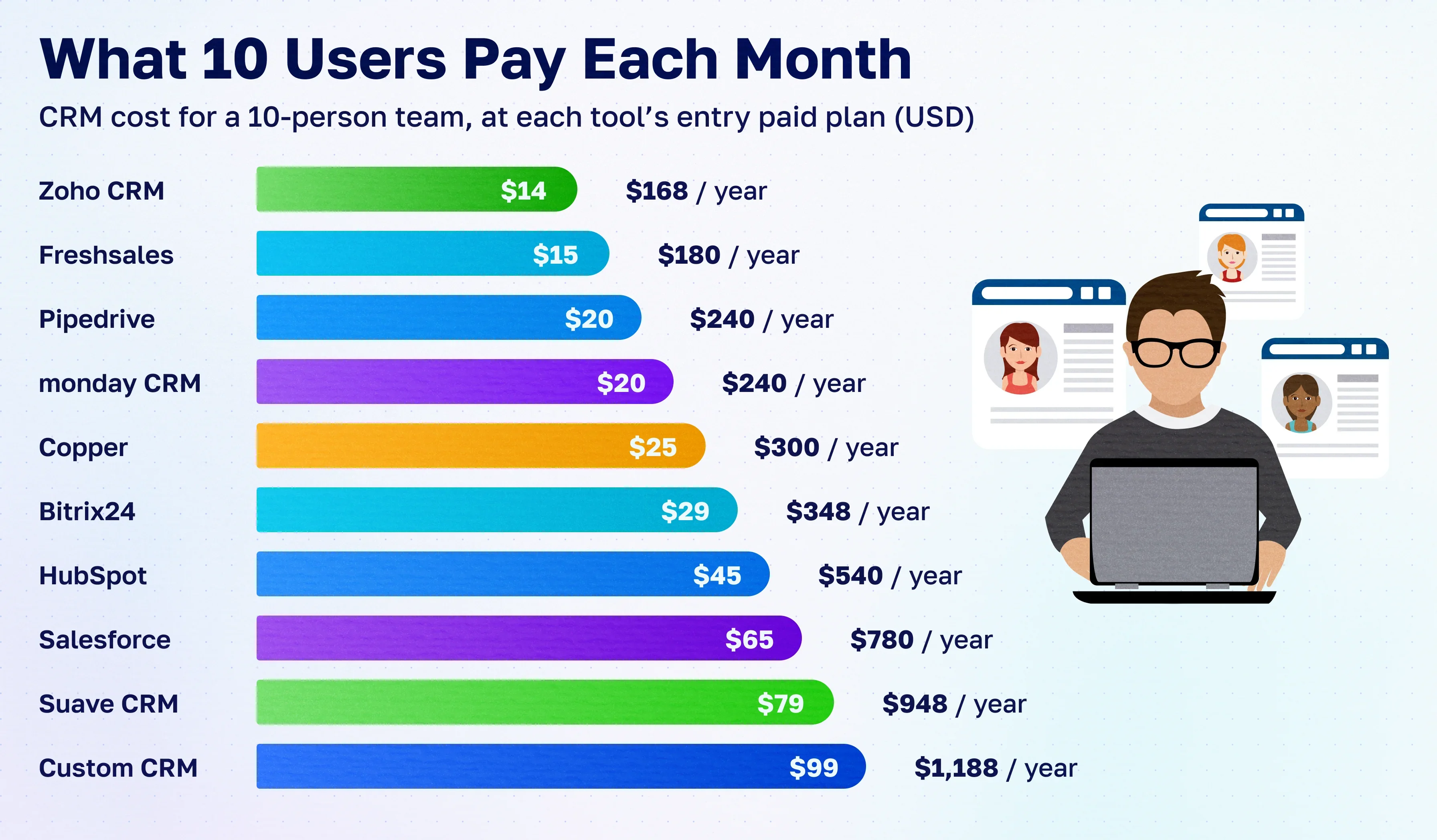
Per-user prices look small until everyone needs a login. Here is the CRM bill alone for 10 users at each tool's entry paid tier:
| CRM | Plan | Per user per month (USD) | 10 users per month | 10 users per year |
|---|---|---|---|---|
| Suave CRM | Free | 0 | 0 | 0 |
| Freshsales | Growth | about 9–11 | about 90–110 | about 1,080–1,320 |
| Zoho CRM | Standard | 14 | 140 | 1,680 |
| Pipedrive | Lite (annual) | about 14 | about 140 | about 1,680 |
| Monday CRM | Basic | 18 | 180 | 2,160 |
| HubSpot | Starter | about 20 | about 200 | about 2,400 |
| Copper | Basic | 23 | 230 | 2,760 |
| Salesforce | Starter Suite | 25 | 250 | 3,000 |
| HubSpot | Sales Hub Professional | 90 | 900 | 10,800 |
| Salesforce | Pro Suite | 100 | 1,000 | 12,000 |
Bitrix24 is priced per organisation (Basic USD 49/month covers 5 users), and a custom CRM has no seat fees: you pay once to build, then for hosting and support. These figures cover the CRM only; most tools also need separate project, time-tracking or invoicing software.
How to choose the right CRM
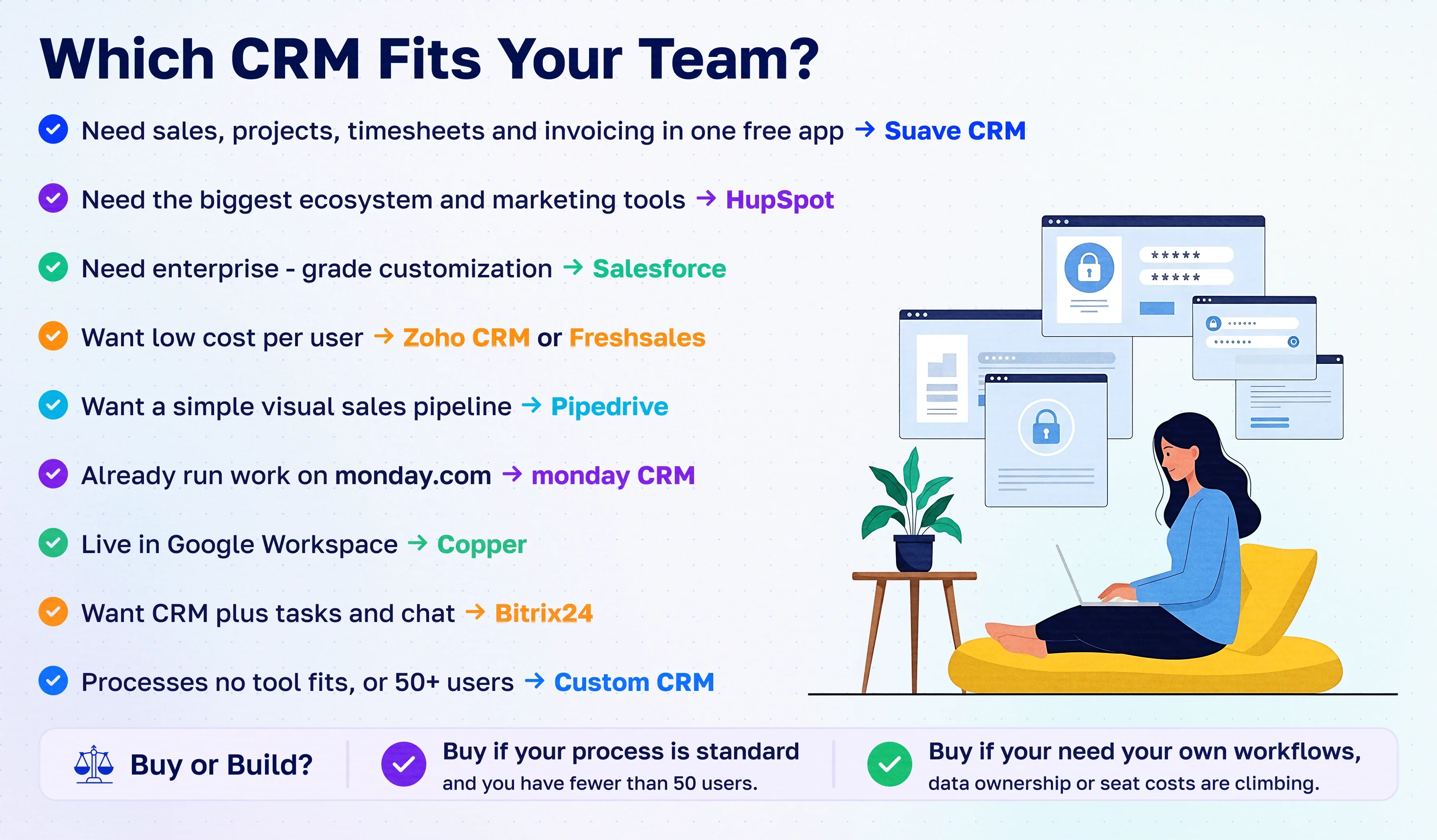
| Your situation | Choose |
|---|---|
| You sell and deliver client work (agency, IT services, consultancy) | A CRM that includes projects, timesheets and invoicing, such as Suave CRM, so a won deal flows into delivery and billing. See our guide to a CRM with time tracking and invoicing. |
| Marketing drives your pipeline | HubSpot |
| You need the lowest cost per seat | Zoho CRM or Freshsales |
| Your team only needs a clean sales pipeline | Pipedrive |
| You expect complex processes and will hire an admin | Salesforce |
| You want free only | Compare the free plans in our best free CRM for agencies guide. |
| Your process is unusual, your data must stay in your own cloud, or you have 50+ users | A custom CRM |
Why consider a Suave Creators CRM?
We build CRMs for a living, so we offer two routes depending on where your business is.
Suave CRM: free, all-in-one, ready today
| What you get | Why it matters |
|---|---|
| Sales pipeline with AI lead scoring | Know which leads to call first |
| Projects, tasks and timesheets | A won deal becomes a project without retyping |
| Invoicing from deals and hours | Bill every hour you log |
| Attendance and HR | See who is working and on what |
| Ask Suave AI assistant and daily brief | Answers and next steps from your own data |
| Free for small and mid-size companies | No seat bill that grows with each hire |
Start Using Suave CRM Free Book a demo
Custom CRM development: built around your process
When no tool fits, we design and build your own CRM, and you keep 100% of the code. Typical builds include:
Typical custom CRM builds
- Cloud CRM development on your own cloud account
- Laravel and Node.js CRM development
- CRM dashboards built for your metrics
- CRM integration with your ERP, accounting and support tools
- Mobile CRM apps for field and sales teams
How to switch CRMs without losing data
Move the records that matter
- Export contacts, companies, deals and notes as CSV from your current CRM.
- Clean duplicates and map old stages to new ones.
- Import companies, then contacts, then deals, so links between them hold.
- Recreate only active pipelines and projects.
- Run both systems for a week, then switch fully.
Our verdict
There is no single best CRM; there is the best fit for how your business works. Pure sales teams do well with Pipedrive or HubSpot, cost-focused teams with Zoho or Freshsales, and complex enterprises with Salesforce. If your team sells and delivers client work, Suave CRM gives you sales, projects, time and invoicing free in one place. And if you've outgrown every tool, a custom CRM you own often costs less over three years than paying per seat.