





 +91 88949 00142
 +1 (307) 435-9605
Key takeaways
- A logistics CRM manages quotes, lanes, shipments and customer accounts in one place, not just contacts and deals.
- Generic CRMs fail freight teams because they don't understand quotes by lane, mode and weight, or connect to dispatch and tracking.
- The cost depends most on integrations (TMS, rate sources, accounting, tracking), not on the number of screens.
- A focused first release covers lead capture, lane-based quoting, a sales pipeline and customer history; dispatch links and AI follow later.
Freight teams do not lose deals because they lack another contact field. They lose them when quotes live in spreadsheets, the pipeline lives in a generic CRM, and shipments live somewhere else. A logistics CRM closes that gap.
What is a logistics CRM?
A logistics CRM is customer relationship management software built for freight forwarders, carriers and third-party logistics (3PL) companies. Alongside contacts and deals, it manages quote requests by lane, mode and weight, links won quotes to shipments, and gives sales and operations one shared view of every customer account.
Why generic CRMs struggle in freight and logistics
Most CRMs are designed around a simple sale: one product, one price, one close date. Freight sales look different:
- Every quote is a calculation. Price depends on origin, destination, mode (air, ocean, road), weight, volume and service level, and rates change often.
- The same customer buys repeatedly on different lanes, so the account history matters more than a single deal.
- Sales and operations overlap. A won quote becomes a shipment that operations must book, track and invoice.
- Inquiries arrive everywhere: email, phone, web forms, WhatsApp and marketplaces, often in a shared inbox no one owns.
Teams end up running quotes in spreadsheets, deals in a CRM and shipments in a separate system, and nobody sees the full picture. That gap is the problem a logistics CRM solves.
Must-have features of a logistics CRM
| Feature | What it does | Why it matters in freight |
|---|---|---|
| Multi-channel lead capture | Pulls inquiries from email, web forms, phone and chat into one queue | No quote request gets lost in a personal inbox |
| Lane-based quoting | Builds quotes by origin, destination, mode, weight and service level | Faster, consistent quotes instead of spreadsheet math |
| Sales pipeline by lane and mode | Tracks each quote from request to won or lost | Shows where volume is being won and lost |
| Customer account history | Every quote, shipment, issue and invoice on one account | Repeat business depends on knowing the history |
| Follow-up automation | Reminders and sequences for open quotes | Most freight quotes are lost to slow follow-up |
| Shipment link | Turns a won quote into a booking record for operations | Removes double entry between sales and ops |
| Role-based access | Separate views for sales, operations, finance and management | Each team sees what it needs, nothing more |
| Dashboards | Win rate, response time, revenue by lane and customer | Managers see performance without manual reports |
Features that add the most value once the basics work
- AI lead scoring that ranks inquiries by likely value and fit.
- AI-drafted quotes and follow-ups from the inquiry details.
- Customer portal where shippers request quotes and see shipment status.
- Mobile access for field sales and depot staff.
How a logistics CRM fits with your other systems
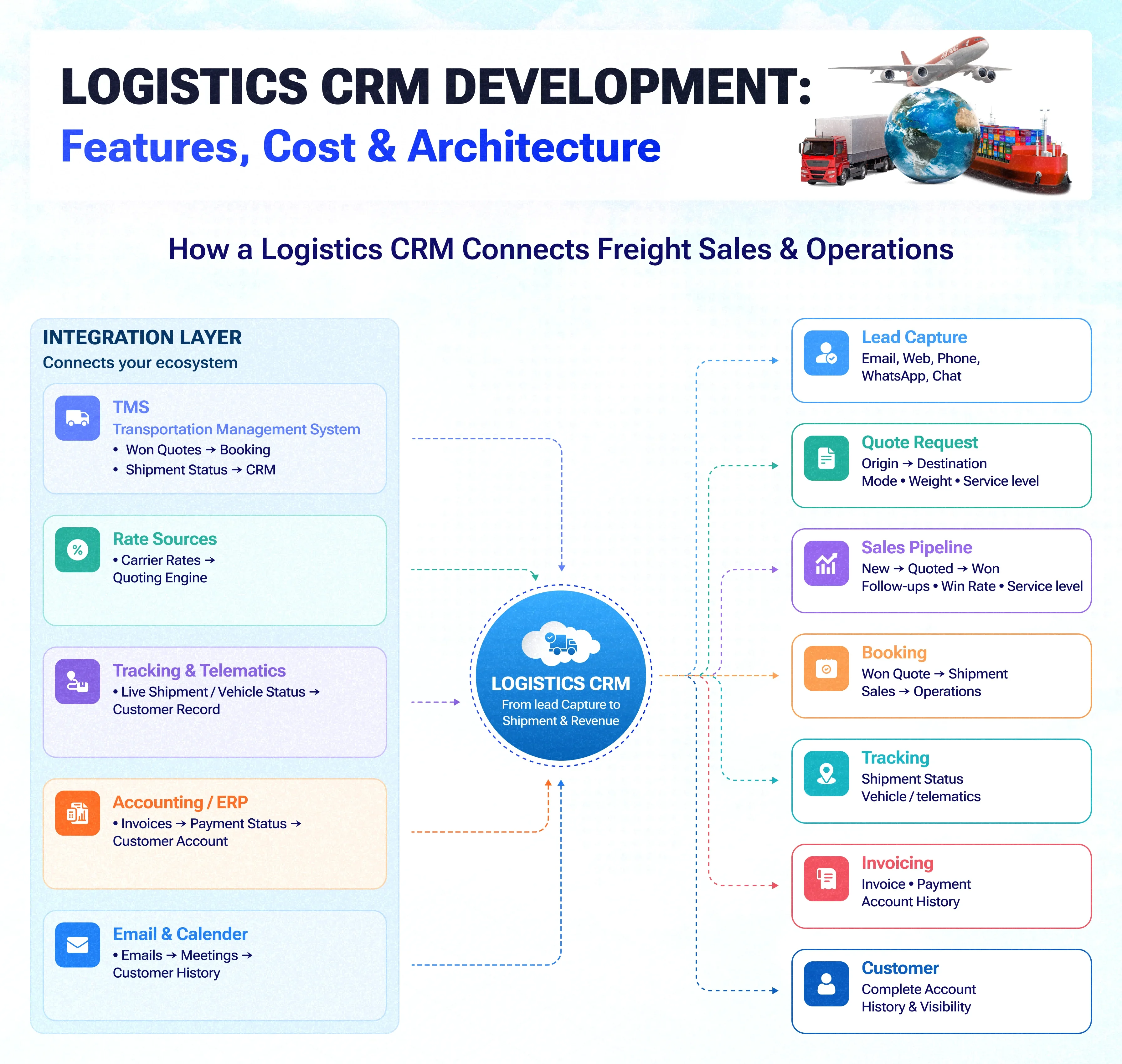
A logistics CRM rarely stands alone. It sits between the customer-facing side of the business and the operational systems:
| System | What flows to and from the CRM |
|---|---|
| Transportation management system (TMS) | Won quotes become bookings; shipment status flows back to the account |
| Rate sources | Carrier rates and tariffs feed the quoting engine |
| Tracking and telematics | Live shipment and vehicle status shown on the customer record |
| Accounting or ERP | Invoices and payment status on each account |
| Email and calendar | Every message and meeting logged against the customer |
The integrations decide most of the project's complexity. Read more in our guide to CRM integration services.
Architecture we recommend for a logistics CRM
- Back end: Laravel for business rules, quoting logic and permissions, with a Node.js service if live tracking updates are needed.
- Database: PostgreSQL, because quotes, lanes, shipments and accounts are tightly related. See CRM database design in our custom CRM work.
- Front end: React dashboards for sales and operations; a mobile CRM app for field teams.
- Integration layer: queued, logged API connections to the TMS, rate sources and accounting, so one failing system doesn't stop sales.
- Hosting: a cloud account you own, with role-based access and audit logs.
Custom logistics CRM vs off-the-shelf CRM
| Question | Off-the-shelf CRM | Custom logistics CRM |
|---|---|---|
| Lane and mode-based quoting | Needs add-ons or spreadsheets | Built into the quote flow |
| Link to dispatch and tracking | Limited, often via third-party connectors | Designed around your TMS and tracking |
| Cost as the team grows | Per-seat licences rise with every hire | One-time build plus hosting and support |
| Time to start | Days | A first release in weeks to a few months |
| Ownership | Vendor owns the platform and your data model | You own the code and data |
An off-the-shelf CRM is often fine for a small team with simple quoting. A custom build pays off when quoting is complex, sales and operations share data, or per-seat costs are growing fast. For the cost side of that decision, see custom CRM vs Salesforce: 3-year TCO.
How much does logistics CRM development cost?
The cost of a custom logistics CRM depends on four things, in order of impact:
- Integrations: each TMS, rate source, tracking feed or accounting system adds work.
- Quoting complexity: a single-mode quote form is simple; multi-mode, multi-leg pricing with surcharges is not.
- Users and roles: more roles mean more permission rules and views.
- Extras: customer portal, mobile app and AI features.
| Build tier | Typical scope | Indicative cost | Typical timeline |
|---|---|---|---|
| Focused first release | Lead capture, quoting for one or two modes, pipeline, account history, dashboards | USD 25,000–45,000 | 8–12 weeks |
| Operations-connected | Adds TMS and accounting integration, follow-up automation, role-based views | USD 45,000–90,000 | 3–5 months |
| Full platform | Adds customer portal, mobile app, live tracking, AI scoring and drafting | USD 90,000–160,000 | 5–8 months |
How long does it take to build a logistics CRM?
A focused first release with lead capture, quoting, a pipeline and customer history typically takes 8–12 weeks. Integrations with a TMS, accounting system or tracking feed add time, so most teams launch the core first and connect operations systems in later phases, each one usable on its own.
Real results: a logistics team centralizing sales
Turbo Trans Corporation, a logistics and freight forwarding company with 100+ employees offering air, ocean and land freight and customs clearance, worked with Suave Creators to bring its leads, follow-ups and pipeline into one system. Leads had arrived from many channels with no central record, follow-ups were slow and the pipeline was hard to see.
42%
More qualified leads
3.4×
Faster average lead response
68%
Pipeline visibility
2.8×
Year-over-year revenue growth
A five-step plan to build your logistics CRM
Build plan
- Map your quote-to-cash flow: how inquiries arrive, how quotes are priced, how a won quote becomes a shipment and an invoice.
- Pick the first release: the smallest set of features that removes the most spreadsheet work, usually quoting, pipeline and account history.
- List the integrations and decide which system owns each piece of data.
- Build in two-week sprints with your sales and operations leads reviewing each demo.
- Migrate and launch with data cleaned from your old CRM and spreadsheets, then add operations links, portal and AI in phases.
When a logistics CRM is not the right next step
If your team is under about ten people, quotes are simple and most business is repeat work from a few customers, a well-configured off-the-shelf CRM is usually enough. A custom build makes sense when quoting is complex, several teams share customer data, or licence costs and spreadsheet work keep growing.