





 +91 88949 00142
 +1 (307) 435-9605
Total Threats
2,845
▲ 8.4% vs Q2 2025
B2B SaaS / Work Management
We redesigned the suave app’s Tasks module into one B2B CRM task management workspace — Kanban and List view integration, inline create, a task drawer, and an automated task assistant AI — with about 50% less switching between views.
The Suave.App
Total Threats
2,845
▲ 8.4% vs Q2 2025
Critical Incidents
142
▼ 12.1% vs Q2 2025
Avg MTTR (Mins)
18.4m
▼ 4.2m vs Q2 2025
Phishing Blocked
98.6%
▲ 1.2% vs Q2 2025
Loss Prevented
$6.4M
▲ 91.1% vs Q2 2025
The Suave App: B2B CRM Task Redesign
Before: Complex Process


After: Clear Workspace

+Inline Create
Create tasks in context, instantly.

Task Drawer
Details & collaboration within reach.

AI Assistant
Prioritizes and optimizes, integrated.

50% Fewer Switches
Streamlined work, more focus.
+50%
+45%
1
4
Overview
The original Tasks module in the suave app spread B2B CRM task management work across separate list and board screens. Creating a task, changing status, logging time, and reading comments often meant opening full pages or jumping between views. Project switching relied on a dropdown instead of a searchable sidebar, and managers had to hunt filters to see overdue work or team workload.
We redesigned the suave app around one AI project management software workflow. Teams pick a project from a searchable sidebar, work the backlog with Kanban and List view integration, update priority and assignees inline, and open a side drawer for overview, comments, time logs, and attachments. Bulk create supports fast project kickoffs. An automated task assistant AI sits beside the workspace so teams can create tasks by typing, list assigned work, and check delivery analytics in plain language.
Routine B2B CRM task management now takes about 50% less switching between separate views. Teams move from project search to daily progress — create, assign, track, and log time — without leaving one screen. The clearer experience in the suave app gives people more time to ship client work and shows how thoughtful product design turns a complicated delivery process into efficient AI project management software.
Kanban & List
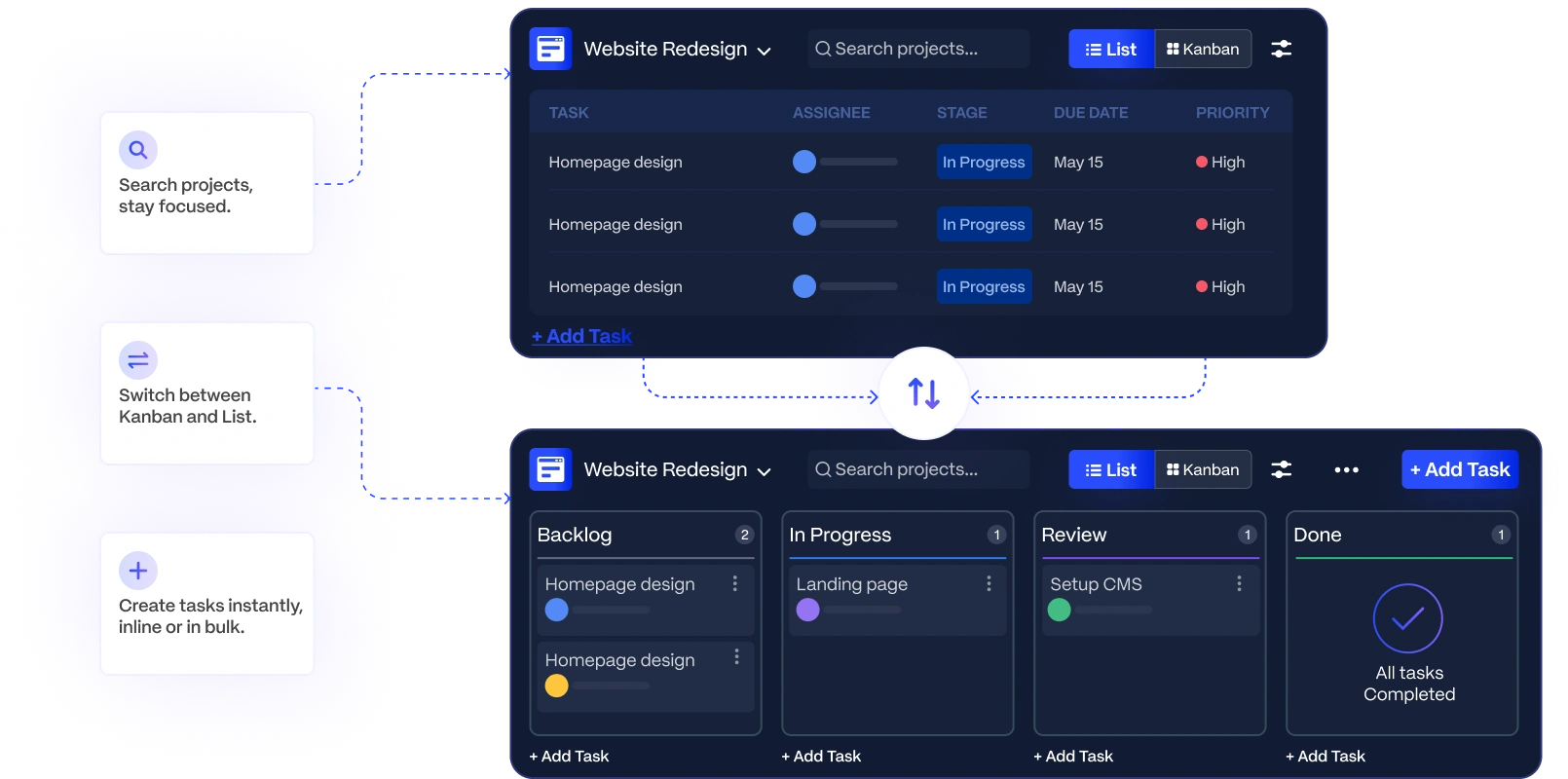
In the suave app, teams search projects in a sidebar, then work that project’s backlog in List view or switch to Kanban to drag cards across project-specific stages. They create tasks inline, bulk-create for fast kickoffs, and open a drawer for details without losing their place in the B2B CRM task management workspace.
AI Assistant
An automated task assistant AI sits beside the workspace in the suave app. Teams ask what is overdue, show assigned tasks, or check workload and status totals — then create a new task by typing a title and confirming a suggested description.


Online